








12 Essential MetaMask Security Tips to Protect Your Wallet in 2026

Introduction
MetaMask remains the most widely used non-custodial wallet in the Web3 ecosystem — and that popularity makes it a prime target. As DeFi protocols grow more complex and NFT markets attract broader participation, the attack surface available to malicious actors has expanded significantly. Wallet drainers, approval phishing, and RPC hijacking are no longer fringe exploits — they are industrialized threats operated at scale.
The responsibility for protecting your assets falls entirely on you. There is no customer support line, no chargebacks, and no insurance in a default MetaMask setup. Understanding that reality is the foundation of every tip in this guide.
This article is structured for intermediate users who understand how wallets work but want to harden their setup, and for beginners who are actively engaging with DeFi or NFTs and need a clear, actionable framework.
The 12 Essential MetaMask Security Tips
Tip 1: Never Store Your Seed Phrase Digitally
Your 12-word (or 24-word) Secret Recovery Phrase — commonly called a seed phrase — is the master key to your wallet. Anyone who holds it controls every asset across every account derived from it.
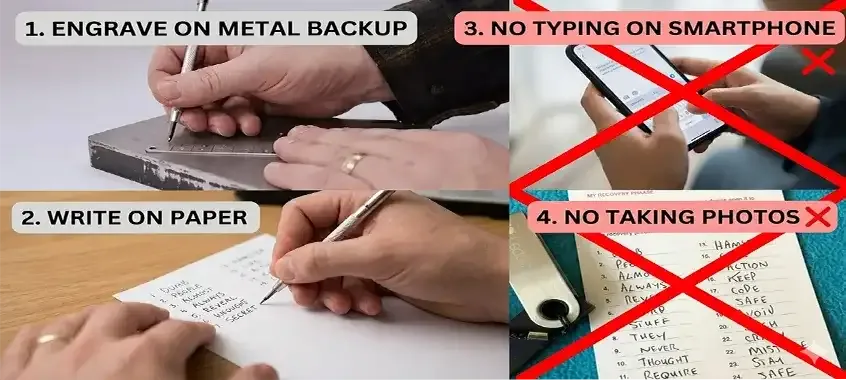
Never photograph it, paste it into a notes app, save it in cloud storage, or type it into any website. Write it on paper, store that paper in a physically secure location (a fireproof safe is ideal), and consider making two copies kept in separate locations. Hardware-encrypted metal backups (such as Cryptosteel) are an additional layer of physical resilience.
Tip 2: Treat Every "Enter Your Seed Phrase" Prompt as a Red Flag
MetaMask will never ask for your seed phrase to confirm a transaction, unlock your wallet on a dApp, or receive a reward. Any site, pop-up, Discord message, or email that requests your seed phrase is executing a social engineering attack. Close the tab immediately and do not interact further.
Tip 3: Verify the MetaMask Extension Source
Browser extension stores occasionally host counterfeit MetaMask extensions designed to steal credentials. Always install MetaMask exclusively from metamask.io or the official Chrome Web Store listing maintained by ConsenSys. Check the publisher name, the number of reviews, and the extension ID before installing. The legitimate Chrome extension ID is nkbihfbeogaeaoehlefnkodbefgpgknn.
Tip 4: Use a Dedicated Browser Profile for Web3
Compartmentalize your crypto activity. Create a separate browser profile or use a dedicated browser instance solely for DeFi and NFT interactions. This limits the blast radius if another extension in your main profile is compromised, and reduces the risk of cross-site tracking or malicious script injection from unrelated browsing activity.
Tip 5: Regularly Audit and Revoke Token Approvals
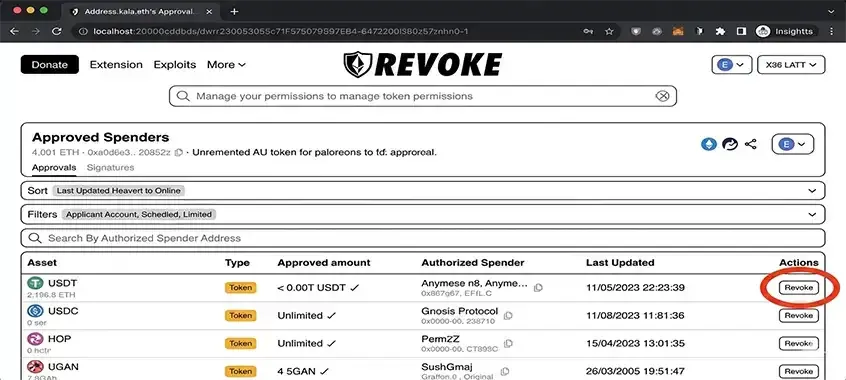
Every time you interact with a DeFi protocol, you likely sign a token approval — permission that allows a smart contract to spend your tokens up to a specified amount (or in many cases, an unlimited amount). These approvals persist indefinitely unless you explicitly revoke them.
Use tools such as Revoke.cash or Etherscan's Token Approval Checker to audit active approvals on all chains you use. Remove any approvals for contracts you no longer interact with, and avoid granting unlimited approvals when a bounded approval suffices.
Tip 6: Scrutinize Every Transaction Signature Request
Before confirming any transaction, read the full details in the MetaMask prompt. Pay attention to:
🔹 Recipient address: Confirm it matches the intended contract or wallet.
🔹 Value: Ensure the ETH or token amount is correct.
🔹 Function name: Legitimate swaps call functions like swapExactTokensForTokens, not transfer to an unfamiliar address.
🔹 setApprovalForAll: This function grants a contract permission to move all NFTs in a collection. Only sign it for platforms you explicitly trust.
If a prompt is unclear or uses generic language like "Execute" with no readable breakdown, decline and investigate before proceeding.
Tip 7: Enable MetaMask's Built-In Security Alerts
MetaMask includes a security alerts feature that cross-references transaction destinations against known phishing and malicious contract databases. Ensure this setting is enabled under Settings → Security & Privacy → Use Phishing Detection. Additionally, browser extensions such as Wallet Guard or Fire provide an additional layer of pre-transaction simulation, showing you what a transaction will actually do before you sign it.
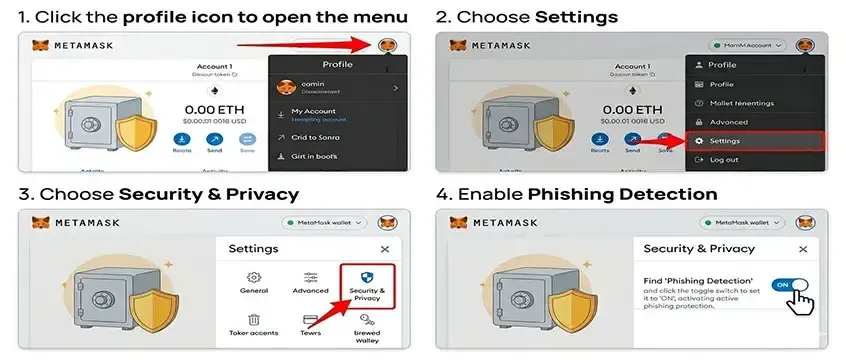
Tip 8: Configure a Custom RPC Endpoint Carefully
MetaMask connects to blockchains via RPC (Remote Procedure Call) endpoints. A compromised or malicious RPC node can display falsified balances and manipulate transaction data. When adding custom networks, use reputable, audited RPC providers. Do not paste RPC URLs from unverified Discord servers, Telegram groups, or social media posts — this is a common vector for network spoofing attacks. For Ethereum mainnet, the default Infura endpoint is reliable. For other chains, cross-reference RPCs with the network's official documentation or chainlist.org.
Tip 9: Keep MetaMask and Your Browser Updated
Security vulnerabilities are discovered and patched continuously. Running an outdated version of the MetaMask extension or your browser leaves you exposed to known exploits. Enable automatic updates for both, and periodically verify that the installed version matches the latest release noted on MetaMask's official GitHub or website.
Tip 10: Use a Separate "Hot" Wallet for Daily Activity
Adopt a multi-wallet architecture. Designate one MetaMask wallet (funded with only the assets needed for a specific session) for active DeFi and NFT interactions. Keep the majority of your holdings in a separate, rarely connected wallet — ideally backed by a hardware device. This way, even if your active wallet is drained, your primary holdings remain protected.
Tip 11: Be Vigilant Against Clipboard Hijacking and Wallet-Draining Scripts
Malware known as clipboard hijackers can silently replace a copied wallet address with an attacker's address the moment you paste it. Always visually verify the full address — not just the first and last characters — after pasting into any transaction field. Similarly, avoid visiting unfamiliar NFT minting pages or clicking links from unsolicited direct messages, as these sites frequently embed wallet-draining JavaScript that triggers malicious approvals the moment you connect your wallet.
Tip 12: Use a Strong, Unique Password and Lock Your Wallet When Idle
MetaMask's local password protects access to the extension on your device. Use a long, randomly generated password stored in a reputable password manager. Enable the setting to lock MetaMask automatically after a period of inactivity (Settings → Advanced → Auto-Lock Timer). This limits exposure if your device is accessed without your knowledge.
The Pro Layer: Hardware Wallet Integration
The single most effective security upgrade for a MetaMask user is integrating a hardware wallet — specifically Ledger or Trezor.
A hardware wallet stores your private keys in a dedicated, air-gapped microcontroller that never exposes the key to your computer or the internet. When you connect a Ledger or Trezor to MetaMask via the "Connect Hardware Wallet" option, transaction signing occurs on the physical device. Even if your computer is fully compromised by malware, the attacker cannot sign a transaction without physical access to the hardware wallet and knowledge of your PIN.
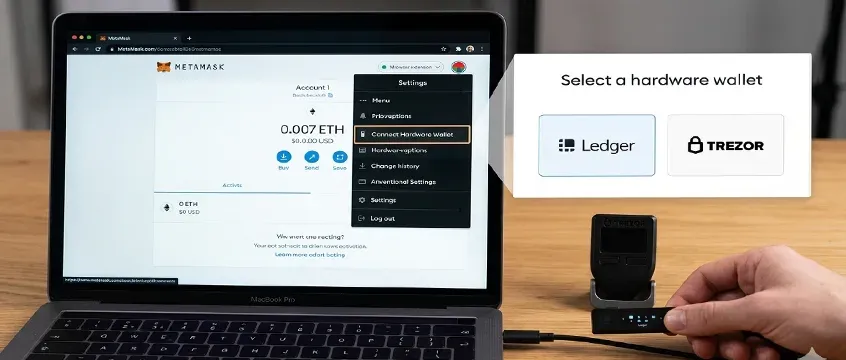
How to connect:
1️. Navigate to MetaMask → Account icon → Connect Hardware Wallet.
𝟐. Select Ledger or Trezor and follow the on-screen pairing instructions.
𝟑. Your hardware wallet accounts will appear in MetaMask and can be used like any other account — except that every outgoing transaction requires physical confirmation on the device.
This approach does not eliminate all risk — phishing can still trick you into signing a malicious transaction directly on the device if you are not reading the device screen carefully — but it eliminates the entire class of remote private key theft, which represents the majority of large-scale wallet hacks.
What to Do If Your Wallet Is Compromised
If you suspect your wallet has been drained or your seed phrase exposed, act immediately:
1️. Move remaining assets: If any funds remain, transfer them to a clean, never-before-used wallet from a different device.
𝟐. Revoke active approvals from the compromised wallet immediately to prevent further drains on other tokens.
𝟑. Do not reuse the compromised wallet or any accounts derived from the same seed phrase.
𝟒. Document the incident: Note transaction hashes, timestamps, and destination addresses. This is required for any formal report.
Reporting to Local Authorities
⟢ Indonesia: File a report with Bappebti (Badan Pengawas Perdagangan Berjangka Komoditi) via their official portal and with the Bareskrim Polri Cyber Crime division. Preserve all on-chain transaction records as evidence.
⟢ United States: Submit a complaint to the FTC at reportfraud.ftc.gov, the FBI's Internet Crime Complaint Center (IC3) at ic3.gov, and the SEC if the incident involves a registered or unregistered security.
⟢ European Union: Report to your national financial regulator and the relevant law enforcement cybercrime unit. Europol's EC3 (European Cybercrime Centre) coordinates cross-border crypto crime investigations.
⟢ Global resource: The Global Anti-Scam Organization (GASO) at globalantiscam.org maintains country-specific reporting resources for crypto fraud victims.
Keep in mind that blockchain transactions are irreversible. Reporting creates a record that may assist in broader enforcement but is unlikely to result in individual fund recovery in most cases.
Conclusion: Adopting a Security-First Mindset
Security in Web3 is not a one-time configuration — it is an ongoing discipline. The threat landscape evolves continuously, and attackers regularly adapt their tactics to exploit new protocols, new user behaviors, and new platform features.
The 12 tips in this guide can be summarized in three principles: minimize exposure (limit approvals, use dedicated wallets, compartmentalize activity), verify everything (addresses, transaction details, extension sources, RPC endpoints), and elevate your key storage (hardware wallets, physical seed phrase backups, no digital copies).
Approach every prompt MetaMask shows you as if an adversary designed it to manipulate you. That skepticism, applied consistently, is the most durable security tool available.
FAQ
➤ Can MetaMask be hacked?
MetaMask itself — as software — is open-source and regularly audited. The application is not typically "hacked" in the traditional sense. However, MetaMask users are frequently compromised through phishing attacks that steal seed phrases, malicious browser extensions, wallet-draining smart contracts that users sign unknowingly, and clipboard hijacking malware. The vulnerability in the vast majority of cases is not the wallet software but the user's interaction with malicious content. Following the security practices in this guide eliminates the most common attack vectors.
➤ How do I recover a stolen wallet?
If your seed phrase has been exposed, recovery of stolen funds is rarely possible due to the irreversible nature of blockchain transactions. Your priority should be securing what remains: transfer any assets left in the wallet to a new, uncompromised wallet immediately. Generate a completely new seed phrase on a clean device and never reuse the compromised one. Report the incident to the relevant authorities in your jurisdiction (see the Geo-Adaptation section above) and to MetaMask's official support channel to flag the draining contract or phishing site.
➤ Is it safe to use MetaMask on mobile?
MetaMask's mobile application carries the same underlying security model as the browser extension, with some additional considerations. Mobile devices are susceptible to malicious apps that can read clipboard content, compromised Wi-Fi networks, and screen-capture malware. Use a dedicated device for high-value activity if possible, ensure your device OS is fully updated, and never install MetaMask mobile from any source other than the official Apple App Store or Google Play Store. The same seed phrase management principles apply without exception.
Published by Coinplurk.com
We use AI technology to help present information faster and more efficiently. However, all content still goes through a human review process. If you find data errors or factual inaccuracies in this article, please report it to our editorial team via the [Report Article] button.
Published by Coinplurk.com
About the Author
CoinPlurk News
Verified AuthorVerified Web3 content architect providing high-impact data analysis and real-time reporting on the global blockchain ecosystem.
Interactive Hub
0 RepliesHave a suggestion, question, or just want to leave a comment on this article? Feel free to write in the discussion section below.
Please login to join the discussion
Login NowNo comments yet. Be the first!